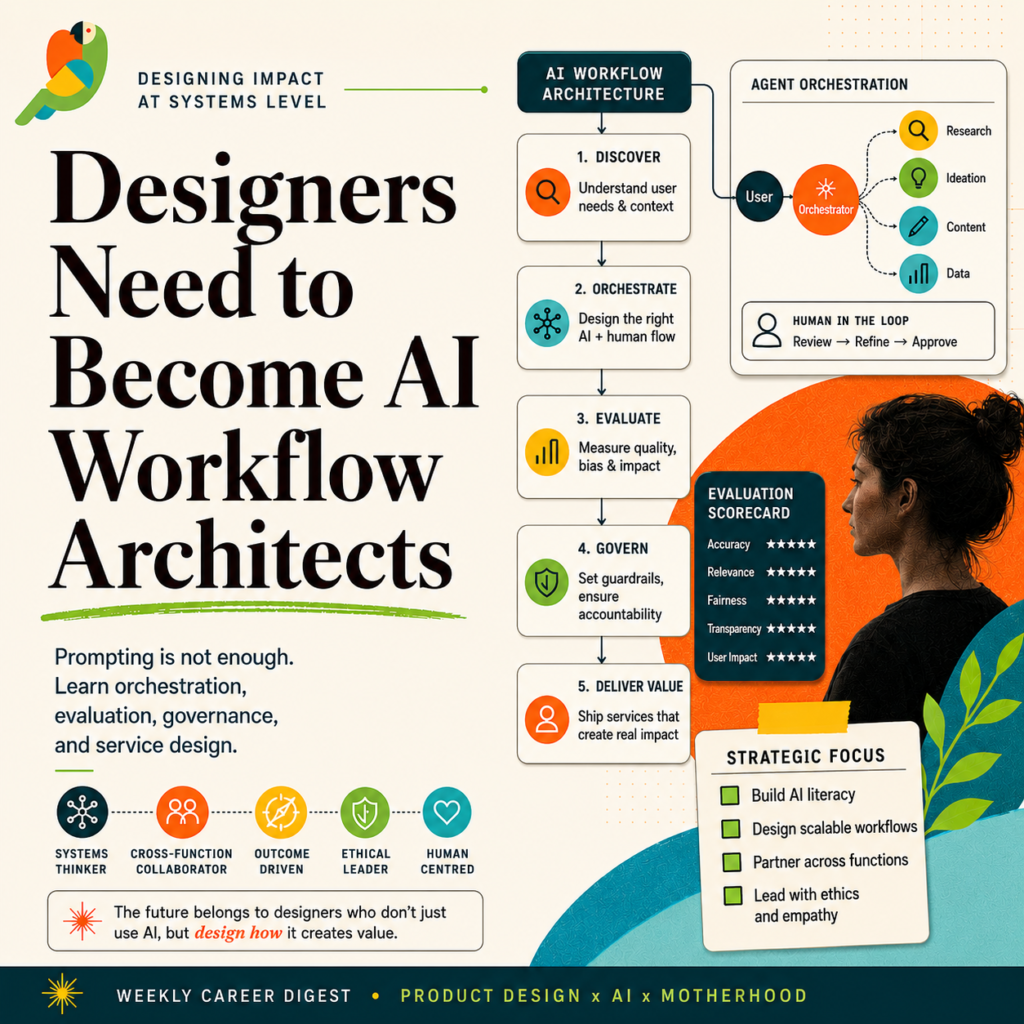
As designers we’re already trained as systems thinkers, and those skills are perfect for becoming AI workflow architects. Our next step isn’t to ‘learn AI’ in the abstract, but to redesign our processes so AI meaningfully amplifies research, ideation, and delivery.
Here is a comparison of skills that I use daily:
| Core skill / competency | What this looks like in practice | How AI can amplify it | Example AI tools & concrete use cases |
|---|---|---|---|
| User research & insight synthesis | Planning interviews, surveys, usability tests; turning raw notes into insights and opportunity areas. | Speed up transcription, clustering, and pattern-finding so you spend more time on judgment than on cleaning data. | Claude / Microsoft Copilot/ChatGPT: Paste interview notes → ask for themes, JTBD, tensions, counter‑examples. – Otter.ai / Voicenotes/Grain + LLM: Auto‑transcribe, pull key quotes for your deck. |
| Problem framing & product thinking | Defining problems, success metrics, constraints, and product strategy; writing PRDs or problem briefs. | Co‑write problem statements, PRDs, OKRs; simulate edge cases or “what if” scenarios. | Claude / Microsoft Copilot /ChatGPT: “Turn these scattered notes into a problem statement, risks, and success metrics.” – Notion AI: Turn rough bullets into a structured PRD section. |
| Systems thinking & flows | Mapping ecosystems, user journeys, information architecture, multi‑channel experiences. | Turn textual scenarios into flow diagrams and IA drafts you refine as the “AI workflow architect.” | – UXMagic /Visily/ wand.app‑style tools: Text → multi‑screen flows in Figma‑ready format. – Mermaid / Whimsical + LLM: Generate initial flowchart code from a narrative. |
| UX design & interaction design | Wireframes, interaction patterns, navigation, states, accessibility, responsive behaviour. uxdesign+3 | Generate first‑pass flows, empty‑state ideas, and interaction variants; audit for missing states. | – Figma AI / Figma Make, Claude Code , Windsurf or CursorW: Ask for “3 variations of this settings screen with better hierarchy.”
|
| UI & visual design | Layout, grids, typography, color, components, design systems; pixel‑level craft. | Suggest themes, tokens, and component variations while you enforce quality and consistency. builder+3 | Figma AI, Magic Patterns: Generate component variants and alt layouts under your design system tokens. – Khroma / Fontjoy / Adobe Firefly: Propose color palettes and type pairs, you choose and refine. |
| Prototyping & interaction demos | Clickable prototypes, micro‑interactions, user test artefacts. | Accelerate “good enough” clickable prototypes and bridge to code faster. | Framer AI: Prompt a concept website, then manually refine layout and interactions. – Figma + AI‑to‑code tools: Export React / HTML scaffolding for engineers or Visily builder+2youtube |
| Content design & UX writing | Microcopy, error states, onboarding flows, naming, help content. cshark+1 | Generate drafts for microcopy, localization variants, and tone explorations; you remain editor‑in‑chief. | Claude / ChatGPT / Gemini: “Give 5 concise, friendly empty‑state messages for this screen.” – Lokalise‑style tools + LLM: First‑pass translations you QA with SMEs. |
| Data‑informed design & experimentation | Reading analytics, setting hypotheses, designing A/B tests, prioritisation. | Summarise analytics, suggest hypotheses, and sketch experiment ideas from raw metrics and event logs. uxmagic+1 | ChatGPT / Claude: Paste a segment of Amplitude exports → “Summarise key drop‑offs and suggest 3 experiment ideas.” uxmagic+1 |
| Collaboration & stakeholder communication | Presenting work, storytelling, alignment with PM/Eng, workshops. | Turn raw work into narratives, decks, and workshop materials faster while you control framing and nuance. designlab+1 | Gamma / Tome: Generate initial stakeholder decks from a brief and screenshots. ChatGPT / Microsoft Copilot/ Claude: Turn Figma comments + notes into a meeting agenda or decision log. |
| Design documentation & systems | Design systems, component libraries, usage guidelines, changelogs. uxdesign+2 | Auto‑generate or update documentation from existing components and usage examples. uxmagic+1 | LLM + Figma plugin: “Generate dos/don’ts and usage guidelines for this button component set.” – Internal doc tools with AI: Keep system docs in sync with latest patterns. |
| Soft skills: communication, empathy, emotional intelligence | Facilitating, negotiating trade‑offs, understanding team & user emotions. cshark+2 | Practise scripts and difficult conversations, simulate user personas, explore “what if I say it this way?” safely. uxmagic+2 | Claude / ChatGPT: Role‑play a tough stakeholder or frustrated user to rehearse conversations. |
| Learning, experimentation & AI prompting | Continuous learning, trying new tools, building workflows; prompt literacy. designlab+2 | Make you the “AI workflow architect” who designs when, where, and how AI enters the product lifecycle. | Choose a main LLM (Claude / ChatGPT / Gemini) and build repeatable prompt templates for: briefs, flows, copy, research synthesis, QA checklists. |